

Key Takeaways
- Lesson plans aren't migrated. Teachers re-enter them using AI-assisted tools, since teachers know their plans best.
- Sequencing prevents disruption. Two weeks minimum for setup, two to three weeks between admin and teacher onboarding.
- Hands-on onboarding drives adoption; real work beats a demo.
- Support continues after go-live with 30-day, 90-day, end-of-year, and back-to-school check-ins.
Switching curriculum platforms can be one of the most operationally complex and under-planned decisions a school leader makes. Data gets lost, teachers lose confidence in the tool before it's even launched and principals are left managing the fallout instead of leading learning. Most of that chaos is avoidable. It traces back to one crucial perspective. That is, migration is treated as a technical event rather than a structured change process.
When it's planned as the latter, with clear phases, defined ownership and realistic timelines, schools move from their old system to Edusfere without instructional disruption and with teachers who are genuinely ready to use it. This guide covers exactly that - what migration involves, how the process is sequenced, what happens to your existing curriculum data, and what school leaders need to decide before even a single teacher logs in.
Quick Facts:
- 57% of teachers cite ineffective curriculum resource use as a major concern
- 9 hrs/week teachers spend on curriculum development on average
- 500+ learning standards per grade level in a typical US district
What Are School Leaders Actually Signing Up For?
Before committing to any platform migration, it helps to be honest about what the status quo is costing you. Schools managing curriculum without a dedicated platform typically carry some version of the same burden, i.e., course maps spread across shared drives, standards alignment done manually in spreadsheets, lesson plans living in individual teacher folders with no visibility across grades or departments. With this, curriculum reviews become document-collection exercises. Accreditation prep means weeks of assembly work. New teachers have no structured way to access what came before them.
Edusfere consolidates all of that, e.g., course and unit structure, standards mapping, lesson planning and instructional calendar, into a single cloud-based environment accessible to teachers and administrators in real time. The migration process is how you get your existing curriculum into that environment without losing what you've built.
What changes after a successful migration
Administrators have live visibility into curriculum across every course and department. Teachers plan inside a system that connects their lessons to units, standards, and the school calendar. Curriculum reviews pull from a single source of truth rather than a stack of disconnected documents.
What doesn't change overnight
The habits and routines teachers have built around their current tools. That's not a platform problem; it's a change management problem and it has a known solution.
What Does Curriculum Migration Actually Involve?
Many principals assume migration means exporting files and uploading them somewhere new. In practice, it covers four distinct workstreams that each need their own timeline:
- Course and unit data transfer: Active courses from the previous system, pulled and structured for the new platform.
- Standards alignment: Ensuring transferred content is correctly mapped to current state or national standards.
- User setup: Administrator accounts, teacher accounts and role-based access permissions.
- System configuration: School branding, SSO integration (especially for Microsoft environments), domain whitelisting and instructional calendar setup.
A Common Misconception
Most platforms migrate course and unit data only, not individual lesson plans. Teachers know their lesson plans far better than any migration team does and lesson planner architectures vary enough across platforms that manual entry by teachers consistently produces more accurate results than automated transfer. Edusfere's AI-assisted import tools and structured templates are specifically designed to make that re-entry fast.
Understanding this scope before kickoff prevents the single biggest source of principal frustration, that is, discovering mid-migration that something critical was out of scope.
The Phased Approach That Prevents Disruption
Schools that complete migrations without instructional disruption follow a predictable sequence. The key is that each phase has a defined owner and the phases don't compress under pressure.
Phase 1: Agreement & Asset Collection (Weeks 1-2)
Once contracts are signed, the Edusfere implementation team collects what it needs to begin including the school logo, administrator user list, standards documentation and domain whitelist requirements. For Microsoft schools, SSO configuration details are gathered at this stage, not after setup has begun. If data is being migrated from a previous platform, login credentials to that system are requested here.
Phase 2: Implementation Call (Week 2-3, approx. 30 min)
A focused call with whoever is leading implementation at the school. Training schedules are confirmed, rollout decisions are made (pilot group vs. full staff, split by division) and outstanding setup questions are resolved. Decision-makers should be on this call, not just a single coordinator. Schools with 45+ teachers typically split teacher onboarding into two sessions here.
Phase 3: Platform Setup & Data Migration (Minimum 2-weeks)
The Edusfere team configures the environment and transfers active course and unit data. A minimum two-week window between credential handoff and the admin onboarding call is required for accurate data migration. Archived courses that need to be preserved must be activated in the source system before transfer begins.
Phase 4: Admin Onboarding & Data Review (60-minute session)
Administrators see the platform for the first time, review migrated data for accuracy, assign teacher access and configure school-specific settings. The call covers the teacher-facing interface briefly, then focuses on admin tools like customization, navigation and decisions that must be made before teachers log in. Build time in for questions about teacher expectations as most administrators need to see the system before they can answer those questions.
Phase 5: Teacher Onboarding (2-3 weeks)
Teachers receive login access roughly 24 hours before their session. The onboarding call walks through platform navigation, existing course and unit review and building a course, unit, lesson and activity from scratch. Teachers bring a device and an existing lesson plan so the session is hands-on, not a demo. Pilot-group models work well for schools managing change fatigue.
Scheduling Principle: Admin onboarding and teacher onboarding should never be scheduled on consecutive days.
What Happens to Your Existing Curriculum Data
The question principals ask most often: Will we lose anything? The honest answer depends on what "anything" includes. The breakdown below shows exactly how each type of curriculum data is handled and by whom.
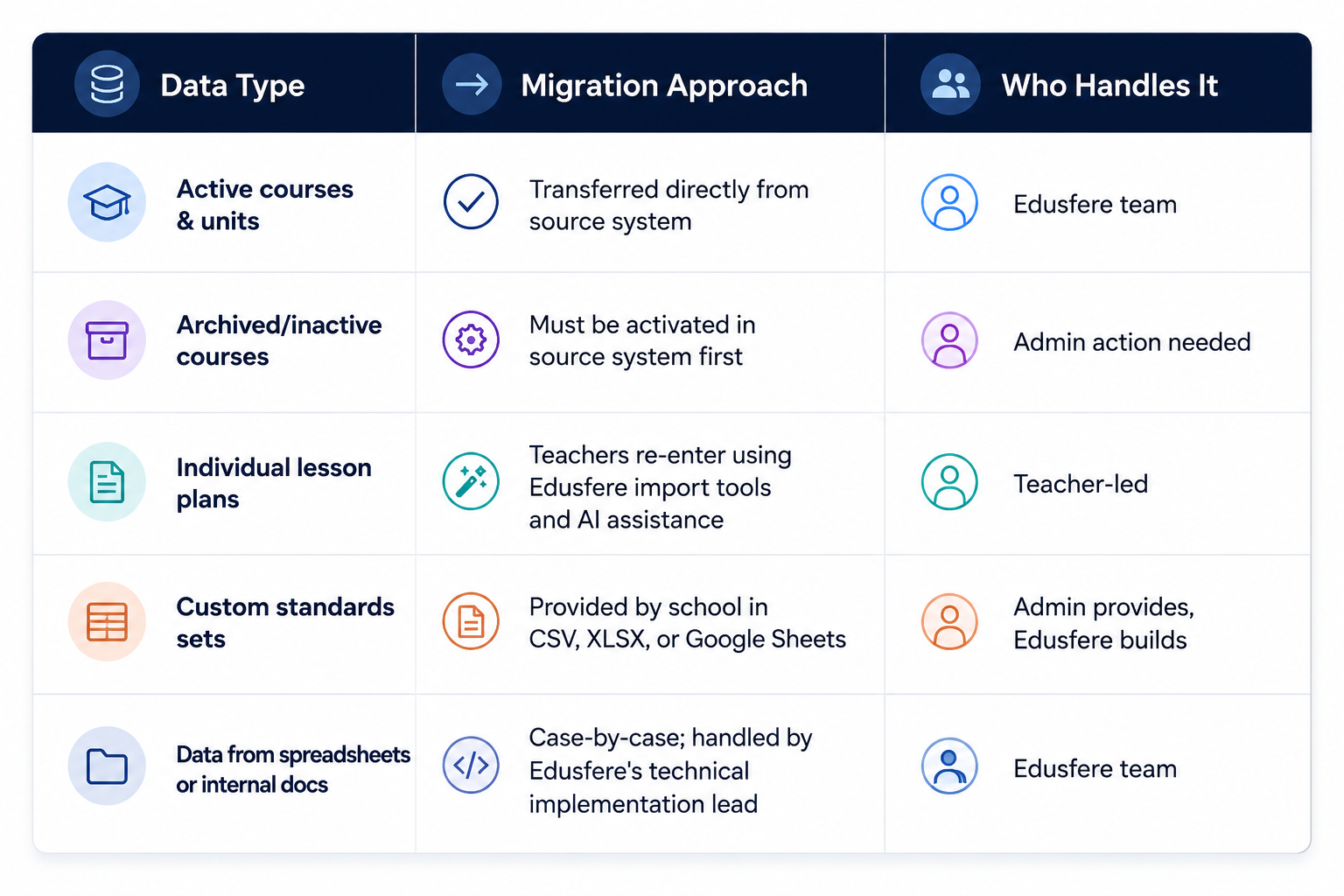
For lesson-plan migration specifically, the rationale for teacher-led re-entry is straightforward. That is, lesson planner architectures differ significantly across platforms and teachers produce more accurate results than any automated transfer process. Edusfere's AI-assisted imports and structured templates dramatically reduce the time involved.
When a school's curriculum lives entirely in internal documents or spreadsheets, not a previous platform, that data can still be migrated. The process is handled case-by-case through Edusfere's technical implementation team.
4 Things School Leaders Must Decide Before Launch
Migration chaos almost always traces back to deferred decisions. These five questions need answers before teacher onboarding is scheduled, not during it.
1. Which courses should be migrated vs. rebuilt from scratch?
Migrated data reflects how courses were structured in the old system. If that structure no longer matches your curriculum scope, a clean build in Edusfere may serve teachers better than carrying over a legacy structure.
2. Will you use a pilot group or full-staff rollout?
Pilot groups or early adopters who train first and support colleagues, reduce cognitive load on the full staff and create internal champions. They work best when the pilot group has time to experiment before the all-staff session is scheduled.
3. What do you expect teachers to complete before Year 1 ends?
Administrators often defer this question until they've seen the platform. But it must be resolved before teacher onboarding, because teachers will ask on the call.
4. Who is the internal point-of-contact post-launch?
The Edusfere implementation team handles structured onboarding. Day-to-day teacher questions need an internal owner, a curriculum coordinator, a department lead or an instructional coach who knows the platform well enough to answer quickly.
Managing Teacher Resistance During Migration
Teacher pushback on new platforms is almost never about the platform. It's about time, uncertainty and the memory of the last technology rollout that didn't stick. Three things reliably reduce resistance are:
Hands-on sessions beat demo sessions: Onboarding calls where teachers work inside Edusfere with their own lesson plan, on their own device, produce better adoption outcomes than walkthroughs. The goal is for teachers to leave with one successful piece of work already completed in the system.
Pilot groups create internal advocates: When experienced teachers become the in-house experts, peer credibility drives adoption in ways vendor communication cannot replicate.
Pre-set expectations reduce post-launch anxiety: Teachers who know exactly what they're expected to have done by a specific date engage with the platform more consistently than those operating under ambiguous timelines.
What Ongoing Support Looks Like
Most vendors disappear after go-live. Edusfere doesn't. The implementation relationship continues through a structured cadence of check-ins designed to surface blockers before they become habits and to make sure the school is getting full value from the platform at each stage of the year.
30-Day Check-In: A direct follow-up to school leadership to see how early usage is going. Common issues surfaced here include the instructional calendar not yet configured, archived courses that were never activated before migration, and teachers who missed the initial training session and need a catch-up.
90-Day Check-In: A milestone conversation about early wins, usage patterns and any areas where targeted support would help. Full integration into daily instructional practice takes time. This check-in acknowledges that and identifies what would make the next phase easier.
End-of-Year Review: A summary of how many courses have been actively built out in Edusfere, recognition of what the school accomplished and a forward-looking conversation about Year 2 goals and any specific needs heading into the next school year.
Back-to-School Touchpoint: A reminder communication before the new year begins with links to the help center, a prompt to verify the instructional calendar is configured for the new instructional period and any relevant platform updates.
How Edusfere Structures This Process
Edusfere is a cloud-based curriculum management platform built for K-12 schools. Its implementation model is structured around the migration sequence discussed above with dedicated onboarding support, AI-assisted lesson importing and standards alignment built into the platform itself.
Data migration is included for schools coming from a previous platform, custom standards sets can be built for non-standard alignment needs. Schools whose curriculum lives in spreadsheets or internal documents can still migrate; Edusfere's implementation team handles that case-by-case.
Frequently Asked Questions (FAQs)
How long does a full Edusfere migration take from contract to teacher onboarding?
For most schools, the full sequence, i.e., asset collection through teacher onboarding, runs 6-10 weeks. The primary variable is how quickly the school provides the required setup materials and how much lead time exists between admin and teacher onboarding. Schools that compress that gap consistently see lower teacher adoption in the first 30 days.
What happens to our lesson plans during migration?
Lesson plans are not transferred automatically. Teachers re-enter lesson content using Edusfere's import tools and AI assistance, which are designed to make the process fast. Lesson planner architectures differ enough across platforms that teacher-led re-entry produces more accurate results than any automated transfer. In fact, teachers know their plans better than any migration team does.
Do we need IT involvement to set up Edusfere?
For most schools, IT involvement is limited to two tasks, i.e., providing the domains that need to be whitelisted and supplying the configuration details needed for SSO and integration setup. The Edusfere team handles the rest.
What if our curriculum isn't in another platform but in spreadsheets and shared drives?
Edusfere has migrated curriculum from internal documents and spreadsheets before. The process is handled case-by-case through the technical implementation lead rather than through a standard automated transfer. Raise this at the implementation call so the right approach can be scoped early.
What if teachers don't adopt the platform after onboarding?
The most common adoption blockers include instructional calendar not configured before teachers logged in, expectations weren't set clearly before the onboarding session or a portion of staff missed the initial training. Edusfere's 30-day check-in is specifically designed to catch these issues early. Schools that use a pilot group before full-staff rollout consistently see stronger sustained adoption.
Ready to plan your curriculum migration?
Talk to the Edusfere implementation team about your school's timeline, existing systems and what a structured migration looks like for your context.
Schedule an Implementation Call at edusfere.com
Resources & Further Reading
- https://www.tandfonline.com/doi/full/10.1080/01596306.2024.2398648
- https://createchange.io/case-studies/work/helping-teachers-save-time-easier-lesson-planning/
- https://edusfere.com/ai-tools-for-teachers-6-best-platforms-for-lesson-planning-curriculum-mapping-an/
- https://edusfere.com/the-2026-guide-to-k-12-accreditation-automating-standards-mapping-in-schools/
- https://edusfere.com/the-back-to-school-curriculum-planning-review-7-checks-every-school-should-compl/
- https://edusfere.com/how-can-curriculum-mapping-improve-new-teacher-onboarding-guide/